Speak. It types.
Nothing leaves your Mac.
Privacy-first dictation for developers and professionals. Speak into VS Code, Claude Code, Terminal, or any app. No cloud. No subscription. Entirely on your Mac.
Free 7-day trial · no card required to start · €19 one-time to keep it forever
Watch NeoDicta transcribe in real time
The 6-stage text pipeline, the live HUD, the per-app context, the 25 languages: all in under a minute and a half.
Voice dictation designed for professionals
Every detail crafted for speed, privacy, and seamless integration.
100% Local & Private
Your audio never leaves your Mac. All processing happens on-device using Apple Silicon.
Sub-Second Transcription
Powered by Parakeet TDT, achieving <300ms latency with state-of-the-art accuracy.
Smart Text Processing
Auto-removes fillers, adds punctuation, expands snippets, and applies your custom dictionary.
25 European Languages
Automatic language detection across 25 languages with no configuration needed.
Built for Developers
First-class support for VS Code, Claude Code, Terminal, Cursor, Xcode: dictate prompts, comments, commit messages, and docs at the speed of thought.
Personal Dictionary & Snippets
Custom vocabulary, voice-triggered snippets, and per-app tone profiles. Yours, stored locally.
Inside the NeoDicta macOS app
A native macOS app that feels right at home on your Mac.
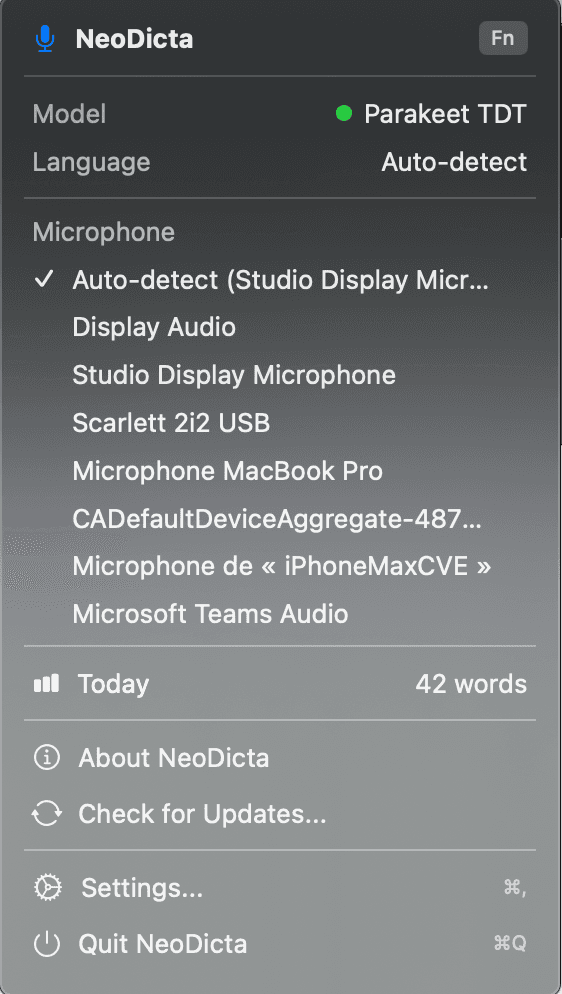
Lightweight menu bar app — always one click away
Works with your dev tools
Dictate prompts to Claude Code, write docs in VS Code, speak git commits in Terminal; NeoDicta injects text wherever your cursor is, via the macOS Accessibility API.
- Claude Code
- Dictate prompts and instructions to Claude directly from your terminal.
- VS Code
- Write code comments, docstrings, and inline documentation without touching the keyboard.
- Terminal
- Speak complex commands, git commit messages, and SSH sessions naturally.
- Cursor
- Voice-driven AI coding: describe what you want built, NeoDicta types it out.
- Xcode
- Add documentation, rename symbols, and write Swift code comments by voice.
- Any App
- Works in Slack, Notion, Mail, Pages, or any macOS app with a text field.
Three seconds to polished text
Hold your hotkey
Press and hold Fn, or configure any key combo you prefer.
Speak naturally
Talk at your normal pace. Corrections and fillers are handled automatically.
Text appears instantly
Polished text is injected directly into the active app at your cursor.
Dictate in 25 languages
Automatic language detection on-device. No configuration, no cloud roundtrip: switch languages mid-session and NeoDicta follows you.
Model: nvidia/parakeet-tdt-0.6b-v3 · 600M parameters · running locally via FluidAudio + Core ML on Apple Silicon · TDT architecture: arXiv:2304.06795 · accuracy benchmarked on the Open ASR Leaderboard
Pay once. Own NeoDicta forever.
The cheapest local-first dictation on Mac. Pay once, own it forever: no subscription, no usage caps, no surprises.
One-time payment. No subscription. Yours forever, with free updates.
Buy NeoDicta · €19Secure checkout via Lemon Squeezy · 14-day money-back guarantee
- One-time payment, never billed again
- All features included from day one
- Free updates: v0.5.5 and beyond
- Personal dictionary, snippets, 25 languages
- Runs on Apple Silicon & Intel Macs (macOS 14+)
- 14-day money-back guarantee
How NeoDicta compares to other Mac dictation apps
Mac dictation pricing, May 2026, public list prices
| Product | Price | Model | Local | Real-time | 3-year cost |
|---|---|---|---|---|---|
NeoDictaBEST VALUE This page | €19 lifetime | Lifetime | ✓ | ✓ | €19 |
Wispr Flow No lifetime option | $15 /month | Subscription | cloud | ✓ | $540 |
Superwhisper Was $249 in 2025, +240% since | $849 lifetime | Sub or Lifetime | ✓ | ✓ | $849 |
VoiceInk | $25 lifetime (1 Mac) | Lifetime | ✓ | ✓ | $25 |
MacWhisper File transcription, not real-time dictation | €59 lifetime | Lifetime | ✓ | files only | ≈$69 |
Aiko File transcription only | $22 lifetime | Lifetime | ✓ | files only | $22 |
Apple Dictation Cloud-dependent, limited | Free built-in | Free | cloud | ✓ | Free |
Save $519 vs Wispr Flow over 3 years. Save $828 vs Superwhisper lifetime.
Sources: wisprflow.ai/pricing · superwhisper.com · tryvoiceink.com · goodsnooze.gumroad.com (MacWhisper) · Apple App Store
Frequently asked questions about NeoDicta
Is NeoDicta really private?
Yes. Speech recognition runs entirely on your Mac: audio buffers are processed in memory and discarded, and nothing is transmitted. The only network calls are the one-time speech-model download and optional update checks. There is no telemetry, no analytics.
How much does NeoDicta cost?
€19, once. It is a lifetime license for up to 3 Macs with all features included and free updates. There is no subscription and no usage cap.
Is there a free trial?
Yes: a 7-day free trial with no credit card required. Download the app and start dictating immediately.
Which languages are supported?
25 European languages with automatic on-device language detection, powered by the Parakeet TDT 0.6B v3 model. You can switch languages mid-session without any configuration.
Does it work offline?
Yes. After the first model download, NeoDicta works with no internet connection at all.
How is NeoDicta different from Wispr Flow or Superwhisper?
Wispr Flow is a cloud subscription at $15/month, so your audio leaves your machine. Superwhisper is local but its lifetime license costs $849. NeoDicta is both local-first and the cheapest lifetime option at €19.
Which apps does it work with?
Any macOS app with a text field: VS Code, Claude Code, Terminal, Cursor, Xcode, Slack, Notion, Mail, Pages and more. NeoDicta injects text at your cursor via the macOS Accessibility API, with a clipboard-paste fallback.
What are the system requirements?
macOS 14 or later, on Apple Silicon or Intel, with about 2 GB of free disk space for the speech model.
How do I get my license key after purchase?
Lemon Squeezy emails it to you right after checkout. If you lose it, retrieve it anytime at neodicta.sponge-theory.ai/account with your purchase email.
Can I get a refund?
Yes, within 14 days of purchase, no questions asked. The 14-day money-back guarantee applies in addition to your statutory consumer rights.
Ready to dictate on your Mac?
One purchase. Lifetime license. Free updates. Yours on day one.
€19 · One-time · No subscription
macOS 14+ · Apple Silicon or Intel · 2 GB free space · Secure checkout via Lemon Squeezy
View release notes →